Coffee Grinder Not Working? What to Check First
If your coffee grinder isn't working, check the outlet, power switch, hopper position, and grind setting first. Unplug it before clearing beans or grounds, and stop if you notice a burning smell, damaged cord, or unusual heat.
On this page (8 sections)
- Why is my coffee grinder not working?
- What should I check before troubleshooting?
- Why won't the grinder turn on?
- What if the grinder hums but no coffee comes out?
- How do I clear a jam safely?
- Why is my grinder running but grinding poorly?
- Could static or retained grounds look like a breakdown?
- When should I stop troubleshooting?
If your coffee grinder is not working, check the outlet, power switch, hopper position, and grind setting before assuming it has failed. Unplug it before clearing a jam, and stop if you notice a burning smell, a damaged cord, or unusual heat.
Start with the simple checks in order. Many grinders won't run if a removable part is out of place, while beans or grounds can block the burrs and prevent grinding.
Why is my coffee grinder not working?
A grinder that won't start may have no power, a control set incorrectly, or a safety part out of position. A grinder that runs but produces no grounds may be jammed or set too fine.
Look for what happens when you press the control: no sound, a hum, or normal motor noise without grounds. That clue helps narrow down the cause without taking apart electrical components.
If the grinder has a screen, check for an error message or a setting that needs attention. Consult its manual for what the message means and which parts need to be in place.
What should I check before troubleshooting?
Check the outlet, cord, switch, hopper, and grind setting before opening the grinder. Keep the unit dry and unplug it before touching beans or grounds near the burrs.
- Confirm the outlet works by checking it with another small appliance.
- Make sure the plug is firmly seated and the cord has no visible damage.
- Check that the hopper, lid, and other removable parts are installed as the manual requires.
- Set the grinder to a normal setting for its design, then try a small amount of beans.
- If it still won't grind, switch it off and unplug it before inspecting for a blockage.
Don't tug on the cord to unplug the grinder. If the cord or plug looks damaged, leave the grinder unplugged and contact the maker or a qualified repair service.
Why won't the grinder turn on?
If the grinder is completely silent, check power and controls first. Confirm the outlet works, reseat the plug, and check that the switch or start button is set as the manual describes.
Some grinders have a removable hopper or lid that must be fitted correctly. Turn off and unplug the machine before reseating those parts, and don't force a piece that won't align.
For a grinder with a timer or digital display, confirm the selected mode and dose settings. A grinder may be ready but not start until you choose a setting or press the right control.
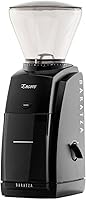
The Baratza Encore has a front-mounted pulse button and an on/off switch. Those controls suit someone who wants a simple grind routine, though a button or switch problem still calls for maker support.
Try one restart after checking the outlet and parts. If the grinder remains silent, avoid repeatedly cycling the switch; unplug it and consult the manual or Baratza support.
What if the grinder hums but no coffee comes out?
A grinder that hums but produces no grounds may have beans or compacted grounds blocking the burr area. Turn it off, unplug it, and follow the manual to remove only the parts meant for routine cleaning.
Empty the hopper and brush away loose grounds with a tool recommended by the manufacturer. Don't put fingers or metal tools into the burrs, and don't pour water into the grinder.
A grind setting that's too fine can also make feeding difficult with some beans or grinders. Check the manual for a safe setting change, then try a small amount of beans after the grinder is reassembled.
If the motor hums while the grinder is empty and clean, stop. A jam that persists may need service, and repeatedly running the motor can make the problem worse.
How do I clear a jam safely?
To clear a possible jam, unplug the grinder and follow its manual for removing and cleaning accessible parts. Use a dry brush or the maker's approved method, and keep hands away from sharp burr edges.
Remove beans from the hopper and check for clumps or foreign objects only where the manual allows. If an object is trapped below a removable part, don't pry at it or disassemble the motor housing.
After cleaning, fit every removable part back into place before plugging in the grinder. Start with a small amount of beans and stop if the same jam returns.
For a deeper cleaning routine, see how to use a burr coffee grinder. That guide covers the steps around setup and grinding so you can check whether the grinder is assembled and used as intended.
Why is my grinder running but grinding poorly?
If the motor runs but the coffee is too coarse, too fine, or uneven, check the grind setting and burr area. Make sure the hopper is seated, the burr area is clean, and the setting matches the brew method.
Change the setting only as the manual recommends. Some models should be adjusted while running; others have different instructions, so don't turn the adjustment forcefully or guess.
The Breville Smart Grinder Pro has 60 settings and a digital display for the selected setting and grind time. That can help you check whether the machine is set for your intended dose and brew style.
For espresso, an overly fine setting can make the grinder work harder. If you brew with a portafilter, compare your setup with our guide to the Breville Smart Grinder Pro grind size chart.
Could static or retained grounds look like a breakdown?
Static and retained grounds can make a grinder seem less effective even when its motor still runs. Clinging grounds, mess, or a small leftover dose aren't the same as a grinder that won't start.
Unplug the grinder, clean accessible areas as directed, and check whether grounds are packed around the exit. For practical ways to reduce clinging grounds, read our coffee grinder static fix.
If the grinder has become louder or less consistent over time, inspect and clean it as the manual permits. Our guide to how long a burr grinder lasts explains common wear signs and when to consider service or replacement.
When should I stop troubleshooting?
Stop troubleshooting if you notice a burning smell, smoke, sparks, a damaged cord, or unusual heat. Unplug the grinder if you can do so safely, and don't try to run it again until it has been checked.
Contact the manufacturer if the grinder is under warranty, a control seems faulty, or it still fails after basic checks and cleaning. Don't open a sealed motor housing or replace electrical parts unless the maker's instructions say you can.
Replacement may be reasonable if the grinder has a recurring motor problem, parts are unavailable, or repair costs more than a suitable replacement. If the burrs seem worn but the motor works, first check whether the maker offers replacement parts.
The OXO Brew Conical Burr Grinder has 15 settings plus 43 micro-adjustments and a one-touch start that remembers its last setting. Those features may fit a home brewer who wants an electric grinder with adjustable settings.
If you are comparing replacement options, our guide to burr grinders and how to pick one explains the main differences to consider. Pick a grinder with controls and cleaning steps you can manage, and follow its manual if the old one shows signs of electrical trouble.
Frequently asked questions
Why won't my coffee grinder turn on?
Check that the outlet works, the cord is fully connected, and the grinder's switch or start control is set correctly. Some grinders also need the hopper or lid in place to run.
Unplug the grinder before checking for a jam, and stop if the cord is damaged or you smell burning.
Why does my coffee grinder hum but not grind?
A hum without grinding can point to beans or packed grounds blocking the burrs, or a grind setting that's too fine for the beans to move through. Switch off and unplug the grinder before clearing anything.
If it still hums when empty and clean, contact the maker for support.
Can I clean a coffee grinder while it is plugged in?
No. Switch it off and unplug it before removing the hopper, brushing out grounds, or inspecting the burr area.
Keep water away from the motor and electrical parts, and follow the manual for parts that can be washed.
Reassemble the grinder fully before plugging it back in.
When should I replace a coffee grinder that stopped working?
Consider service first if the grinder is under warranty or the problem may be a simple jam, loose hopper, or power connection. Replacement may make sense if repairs cost more than a suitable new grinder, parts are unavailable, or the motor repeatedly fails after basic checks.